Future Tool Matrix Template
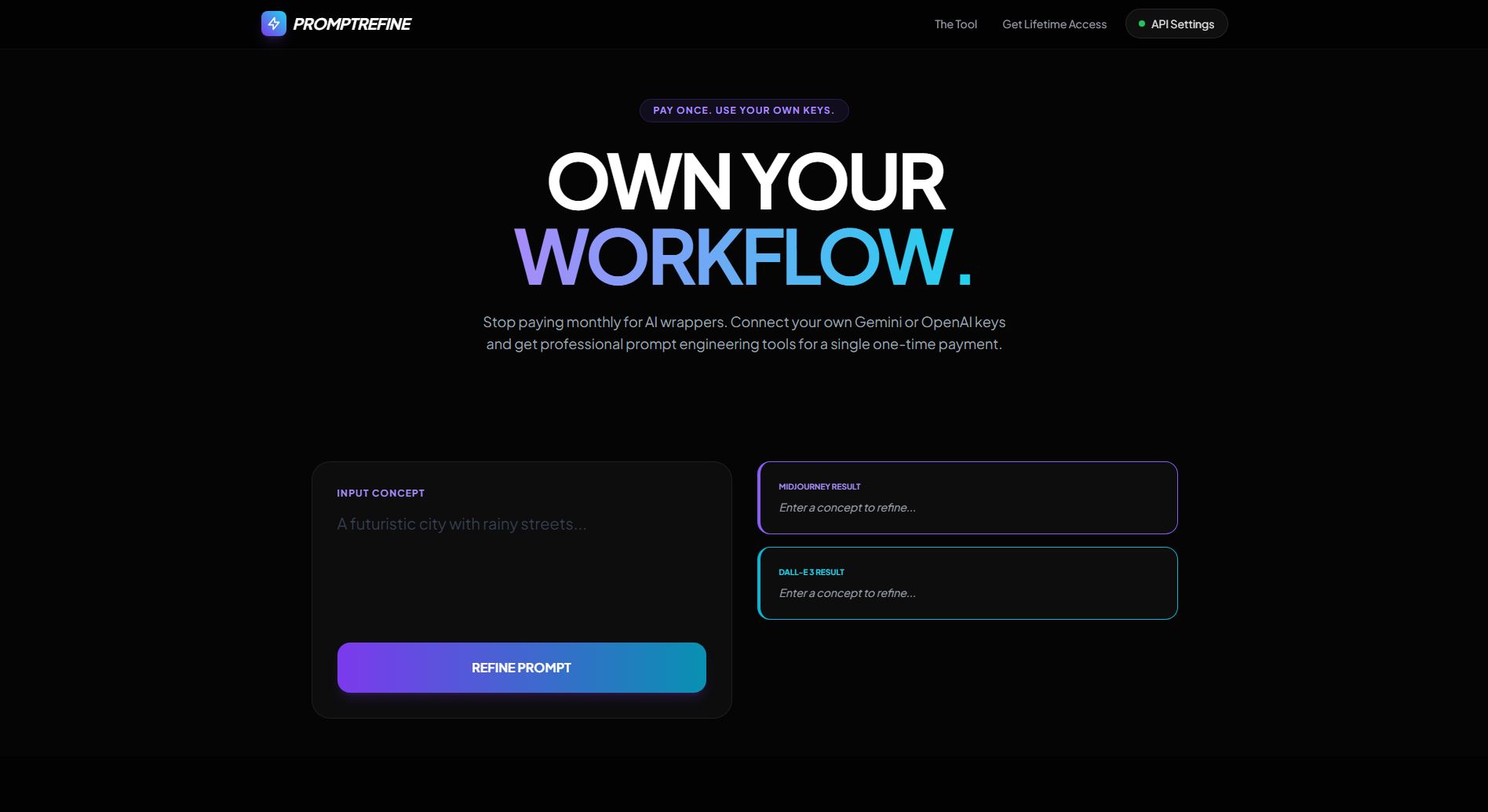
AI Image Prompt Refiner
Transform messy AI image prompts into clean, structured Midjourney or DALL·E‑ready prompts. Paste your rough text and get a polished, optimized prompt instantly.
Live Full Page PreviewSource Code
<!DOCTYPE html>
<html lang="en" class="dark">
<head>
    <meta charset="UTF-8">
    <meta name="viewport" content="width=device-width, initial-scale=1.0">
    <title>PromptRefine AI | Professional Midjourney & DALL-E Prompt Builder</title>

    <!-- Tailwind CSS -->
    <script src="https://cdn.tailwindcss.com"></script>
    <link href="https://fonts.googleapis.com/css2?family=Plus+Jakarta+Sans:wght@300;400;600;700&display=swap" rel="stylesheet">

    <style>
        body { font-family: 'Plus Jakarta Sans', sans-serif; background-color: #050505; scroll-behavior: smooth; }
        .glass { background: rgba(255, 255, 255, 0.03); backdrop-filter: blur(12px); border: 1px solid rgba(255, 255, 255, 0.08); }
        .shimmer { background: linear-gradient(90deg, transparent, rgba(255,255,255,0.05), transparent); background-size: 200% 100%; animation: shimmer 3s infinite; }
        @keyframes shimmer { 0% { background-position: -200% 0; } 100% { background-position: 200% 0; } }
    </style>
</head>
<body class="text-gray-200 selection:bg-violet-500/30">

    <!-- Navbar -->
    <nav class="fixed top-0 w-full z-50 border-b border-white/5 bg-black/50 backdrop-blur-md">
        <div class="max-w-7xl mx-auto px-6 h-16 flex items-center justify-between">
            <div class="flex items-center gap-2">
                <div class="w-8 h-8 bg-gradient-to-tr from-violet-600 to-cyan-400 rounded-lg flex items-center justify-center shadow-lg shadow-violet-500/20">
                    <svg class="w-5 h-5 text-white" fill="none" stroke="currentColor" viewBox="0 0 24 24"><path stroke-linecap="round" stroke-linejoin="round" stroke-width="2" d="M13 10V3L4 14h7v7l9-11h-7z"/></svg>
                </div>
                <span class="font-bold text-xl tracking-tight text-white uppercase italic">PromptRefine</span>
            </div>
            <div class="flex items-center gap-6">
                <div class="hidden md:flex gap-8 text-sm font-medium text-gray-400">
                    <a href="#tool" class="hover:text-white transition">The Tool</a>
                    <a href="#pricing" class="hover:text-white transition">Get Lifetime Access</a>
                </div>
                <button onclick="toggleModal('settingsModal')" class="flex items-center gap-2 px-4 py-2 bg-white/5 rounded-full border border-white/10 hover:bg-white/10 transition text-sm">
                    <span class="w-2 h-2 rounded-full bg-green-500 animate-pulse"></span>
                    API Settings
                </button>
            </div>
        </div>
    </nav>

    <!-- Hero -->
    <header class="pt-32 pb-12 px-6 text-center">
        <div class="max-w-4xl mx-auto relative">
            <span class="inline-block px-4 py-1.5 bg-violet-500/10 text-violet-400 rounded-full text-xs font-bold uppercase tracking-widest border border-violet-500/20 mb-6">Pay Once. Use Your Own Keys.</span>
            <h1 class="text-5xl md:text-8xl font-black text-white mb-6 tracking-tighter leading-none">
                OWN YOUR <br><span class="bg-clip-text text-transparent bg-gradient-to-r from-violet-400 to-cyan-400">WORKFLOW.</span>
            </h1>
            <p class="text-gray-400 text-lg max-w-2xl mx-auto mb-10">
                Stop paying monthly for AI wrappers. Connect your own Gemini or OpenAI keys and get professional prompt engineering tools for a single one-time payment.
            </p>
        </div>
    </header>

    <!-- The Tool Section -->
    <section id="tool" class="max-w-6xl mx-auto px-6 py-12">
        <div class="grid lg:grid-cols-2 gap-8 items-start">
            <div class="glass p-8 rounded-3xl">
                <label class="block text-xs font-bold text-violet-400 uppercase tracking-widest mb-4">Input Concept</label>
                <textarea id="rawInput" class="w-full h-40 bg-transparent border-none focus:ring-0 text-xl text-gray-100 placeholder-gray-700 resize-none font-medium" placeholder="A futuristic city with rainy streets..."></textarea>
                <button onclick="processPrompt()" class="w-full bg-gradient-to-r from-violet-600 to-cyan-600 text-white font-black py-5 rounded-2xl hover:scale-[1.02] transition-all shadow-lg shadow-violet-600/20">
                    REFINE PROMPT
                </button>
            </div>

            <div class="space-y-4">
                <div class="glass p-6 rounded-2xl border-l-4 border-violet-500 relative">
                    <span class="text-[10px] font-black text-violet-400 uppercase block mb-2">Midjourney Result</span>
                    <div id="mjOutput" class="text-sm text-gray-400 italic">Enter a concept to refine...</div>
                    <button onclick="copyToClipboard('mjOutput')" class="absolute top-4 right-4 text-[10px] font-bold text-gray-500 hover:text-white uppercase transition">Copy</button>
                </div>
                <div class="glass p-6 rounded-2xl border-l-4 border-cyan-500 relative">
                    <span class="text-[10px] font-black text-cyan-400 uppercase block mb-2">DALL-E 3 Result</span>
                    <div id="deOutput" class="text-sm text-gray-400 italic">Enter a concept to refine...</div>
                    <button onclick="copyToClipboard('deOutput')" class="absolute top-4 right-4 text-[10px] font-bold text-gray-500 hover:text-white uppercase transition">Copy</button>
                </div>
            </div>
        </div>
    </section>

    <!-- Pricing Section (One-Off Payments) -->
    <section id="pricing" class="py-24 bg-black/50">
        <div class="max-w-7xl mx-auto px-6">
            <div class="text-center mb-16">
                <h2 class="text-4xl font-black text-white mb-4 uppercase tracking-tighter">Lifetime Licenses</h2>
                <p class="text-gray-500 italic">Zero subscriptions. All your own API costs.</p>
            </div>

            <div class="grid md:grid-cols-3 gap-8">
                <!-- Starter Tier -->
                <div class="glass p-8 rounded-3xl border border-white/5 flex flex-col">
                    <h3 class="text-xl font-bold text-white mb-1 uppercase">Starter</h3>
                    <p class="text-xs text-gray-500 mb-6 italic">Kickstart your AI art journey</p>
                    <div class="text-5xl font-black text-white mb-6">$9 <span class="text-xs uppercase text-gray-500 font-bold">Once</span></div>
                    <ul class="text-sm text-gray-400 space-y-3 mb-10 flex-grow">
                        <li class="flex items-center gap-2">✓ Use with personal API keys</li>
                        <li class="flex items-center gap-2">✓ Optimized for MJ v6 & DALL-E 3</li>
                        <li class="flex items-center gap-2">✓ Lifetime UI updates</li>
                    </ul>
                    <a href="https://buy.stripe.com/fZu14o8Yadje6YxaWgfbq02" class="w-full py-4 glass text-white text-center font-bold rounded-2xl hover:bg-white/10 transition">Buy Lifetime</a>
                </div>

                <!-- Pro Tier -->
                <div class="glass p-8 rounded-3xl border-2 border-violet-500 flex flex-col scale-105 z-10 relative">
                    <div class="absolute -top-4 left-1/2 -translate-x-1/2 bg-violet-600 text-white text-[10px] font-black uppercase px-4 py-1 rounded-full">Most Popular</div>
                    <h3 class="text-xl font-bold text-violet-400 mb-1 uppercase">Professional</h3>
                    <p class="text-xs text-gray-500 mb-6 italic">The elite choice for power users</p>
                    <div class="text-5xl font-black text-white mb-6">$19 <span class="text-xs uppercase text-gray-500 font-bold">Once</span></div>
                    <ul class="text-sm text-gray-400 space-y-3 mb-10 flex-grow">
                        <li class="flex items-center gap-2 text-white">✓ Everything in Starter</li>
                        <li class="flex items-center gap-2 text-white">✓ 20+ Custom Style Presets</li>
                        <li class="flex items-center gap-2 text-white">✓ Priority Community Support</li>
                    </ul>
                    <a href="https://buy.stripe.com/cNi00kb6igvq82B0hCfbq03" class="w-full py-4 bg-violet-600 text-white text-center font-black rounded-2xl hover:bg-violet-500 transition shadow-lg shadow-violet-600/30">Unlock Pro</a>
                </div>

                <!-- Agency Tier -->
                <div class="glass p-8 rounded-3xl border border-white/5 flex flex-col">
                    <h3 class="text-xl font-bold text-white mb-1 uppercase">Agency</h3>
                    <p class="text-xs text-gray-500 mb-6 italic">Scalable power for teams</p>
                    <div class="text-5xl font-black text-white mb-6">$49 <span class="text-xs uppercase text-gray-500 font-bold">Once</span></div>
                    <ul class="text-sm text-gray-400 space-y-3 mb-10 flex-grow">
                        <li class="flex items-center gap-2">✓ 5 User Seats Included</li>
                        <li class="flex items-center gap-2">✓ Shared Prompt History</li>
                        <li class="flex items-center gap-2">✓ Priority 1-on-1 Support</li>
                    </ul>
                    <a href="https://buy.stripe.com/3cI5kE7U65QM1Ed7K4fbq04" class="w-full py-4 glass text-white text-center font-bold rounded-2xl hover:bg-white/10 transition">Get Agency</a>
                </div>
            </div>
        </div>
    </section>

    <!-- API Settings Modal -->
    <div id="settingsModal" class="fixed inset-0 z-[100] hidden items-center justify-center p-6 bg-black/80 backdrop-blur-sm">
        <div class="glass w-full max-w-md p-8 rounded-3xl shadow-2xl relative">
            <button onclick="toggleModal('settingsModal')" class="absolute top-6 right-6 text-gray-500 hover:text-white">✕</button>
            <h2 class="text-2xl font-bold text-white mb-2 uppercase tracking-tight">API Setup (BYOK)</h2>
            <p class="text-gray-500 text-xs mb-8">Enter your keys to power the engine. We never store these on our servers.</p>
            <div class="space-y-6">
                <div>
                    <label class="block text-[10px] font-black text-violet-400 uppercase tracking-widest mb-2">Gemini API Key</label>
                    <input type="password" id="geminiKey" class="w-full bg-white/5 border border-white/10 rounded-xl px-4 py-3 text-white focus:ring-1 focus:ring-violet-500 outline-none" placeholder="Enter key...">
                </div>
                <div>
                    <label class="block text-[10px] font-black text-cyan-400 uppercase tracking-widest mb-2">OpenAI API Key</label>
                    <input type="password" id="openaiKey" class="w-full bg-white/5 border border-white/10 rounded-xl px-4 py-3 text-white focus:ring-1 focus:ring-cyan-500 outline-none" placeholder="Enter key...">
                </div>
                <div>
                    <label class="block text-[10px] font-black text-gray-500 uppercase tracking-widest mb-2">Stripe License Key (Unlocked after purchase)</label>
                    <input type="text" id="licenseKey" class="w-full bg-white/5 border border-white/10 rounded-xl px-4 py-3 text-white outline-none" placeholder="XXXX-XXXX-XXXX">
                </div>
            </div>
            <button onclick="saveKeys()" class="w-full mt-10 bg-violet-600 hover:bg-violet-500 text-white font-bold py-3 rounded-xl transition">Save & Start Creating</button>
        </div>
    </div>

    <script>
        window.onload = () => {
            const keys = ['geminiKey', 'openaiKey', 'licenseKey'];
            keys.forEach(k => {
                const val = localStorage.getItem(k);
                if (val) document.getElementById(k).value = val;
            });
        };

        function toggleModal(id) {
            const el = document.getElementById(id);
            el.classList.toggle('hidden');
            el.classList.toggle('flex');
        }

        function saveKeys() {
            localStorage.setItem('geminiKey', document.getElementById('geminiKey').value);
            localStorage.setItem('openaiKey', document.getElementById('openaiKey').value);
            localStorage.setItem('licenseKey', document.getElementById('licenseKey').value);
            toggleModal('settingsModal');
        }

        async function processPrompt() {
            const input = document.getElementById('rawInput').value;
            const license = localStorage.getItem('licenseKey');

            if (!license) {
                alert("Please purchase a license and enter it in API Settings to unlock the tool.");
                location.href = '#pricing';
                return;
            }

            if (!input.trim()) return;

            const mjCard = document.getElementById('mjOutput').parentElement;
            mjCard.classList.add('shimmer');

            setTimeout(() => {
                const keywords = ["cinematic lighting", "8k hyper-realistic", "octane render", "shot on 35mm lens", "intricate details"];
                document.getElementById('mjOutput').innerText = `${input}, ${keywords.join(', ')} --ar 16:9 --v 6.0`;
                document.getElementById('deOutput').innerText = `A high-fidelity digital artwork of ${input}. The scene is rendered with cinematic lighting, extreme attention to texture, and a sense of atmospheric depth. Photorealistic style.`;
                mjCard.classList.remove('shimmer');
            }, 600);
        }

        function copyToClipboard(id) {
            const text = document.getElementById(id).innerText;
            const dummy = document.createElement("textarea");
            document.body.appendChild(dummy);
            dummy.value = text;
            dummy.select();
            document.execCommand("copy");
            document.body.removeChild(dummy);

            const btn = event.target;
            const originalText = btn.innerText;
            btn.innerText = "COPIED!";
            setTimeout(() => btn.innerText = originalText, 2000);
        }
    </script>
</body>
</html>